BaseExtensions can be used to remove content controls after startup using prefixes in Word. This feature can either be executed as an event or as a button.
Module is located here:
...\ModuleLibrary\BaseExtensions\04_nocontext_MISC\01_W_removeContentControlPrefix.xmlCMD
<Cmd case="BaseExtensions:content-delete" docProp="x" prefixes="x" />
Parameters
docProp
Define the name of the document property. When creating the document property in Word, the value of the document property must be set to be true to check whether the command should run for this exact document.
prefixes
Define if any prefixes. For instance, if there are several content controls in a document and some of them are to be removed, name them after your defined prefix in this command.
Here is an example:
We have a document consisting of several content controls named "Apple" and "Banana", and we want to remove all the "Banana" content controls, while the "Apple" content controls should remain.
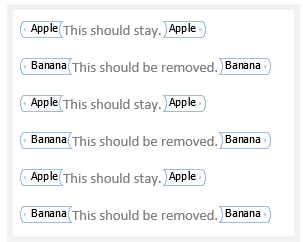
In this case, we call our document property "RemoveBananas" with "Banana" as a prefix. Create a module with this command:
<Cmd case="BaseExtensions:content-delete" docProp="RemoveBananas" prefixes="Banana" />
Now, create a document property in Word with the name "RemoveBanans" and set the value to be true.
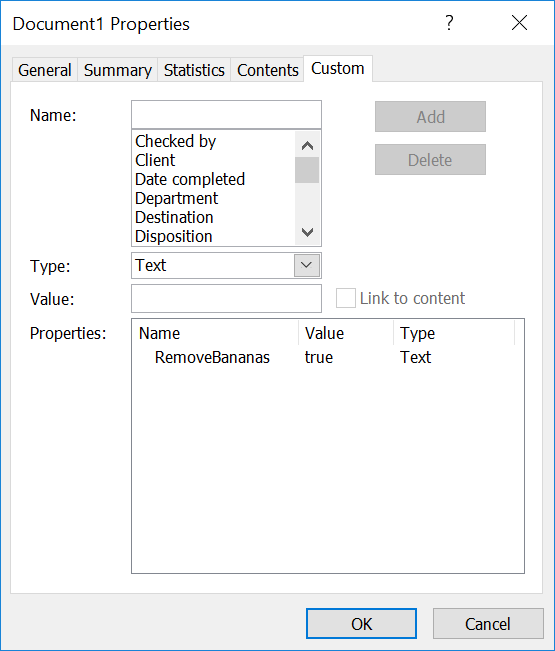
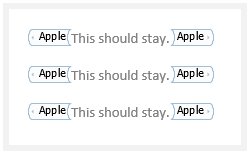
Since "Banana" is our prefix, it will only remove the content controls named "Banana" and other content control will remain:
It is also possible to remove specific content in both Word and PowerPoint, which can be seen in this article.
Was this article helpful?
That’s Great!
Thank you for your feedback
Sorry! We couldn't be helpful
Thank you for your feedback
Feedback sent
We appreciate your effort and will try to fix the article