BaseExtensions can be used to edit specific types of content in both PowerPoint and Word. We are able to create and delete content. This feature can delete table rows, table columns, entire tables, individual bullet points in a list (bullet and numbered), shapes, slides, content controls, bookmarks and document properties, and it can also create a document property. Also, we are able to delete multiple types and identifiers in one command.
Module is located here:
...\ModuleLibrary\BaseExtensions\01_nocontext_Tools\07_WPE_editContent.xmlFunctionality to create content
CMD
<Cmd case="BaseExtensions:content-create" type="x" name="x" value="x"/>
Parameter
type
This parameter is required and defines what type of content that should be created. Currently, we support document properties and content controls.
Use docprop to create a document property or content-control to create a content control.
Parameters to use when creating a document property
name
Define the name for the inserted document property.
value
Define the value for the inserted document property.
NOTE, this feature cannot be used to create document properties containing only a space character for a value. This will result in an empty property, i.e. no characters. To create a document property with a space please refer to this article.
location
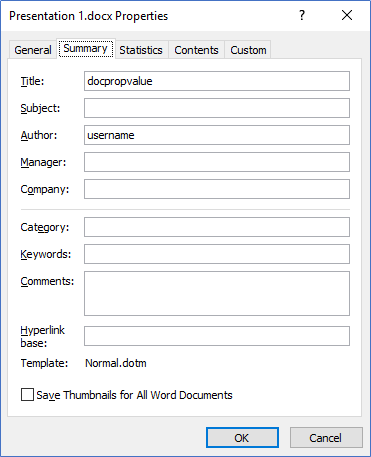
Define the built-in Docprop called "Title" and set it to "BuiltIn".
For instance, this will create a document property named Docpropname with the value docpropvalue:
<Cmd case="BaseExtensions:content-create" type="docprop" name="Docpropname" (or "Title") value="docpropvalue" location="BuiltIn"/>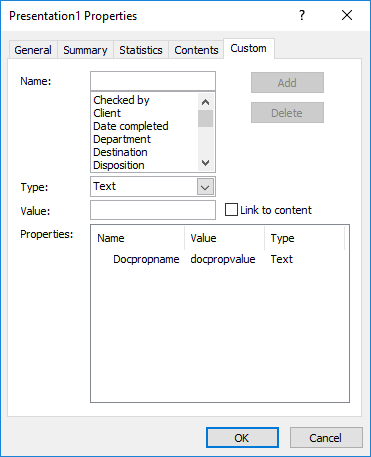
Parameters to use when creating a content control
ContentControlType
This parameter is optional and defines to type of content control that should be created with the command. The following types of content controls are available, and the type must be defined in the parameter with the number:
{
    RichText = 0,
    Text = 1,
    Checkbox = 2,
    Picture = 4,
    ComboBox = 5,
    Date = 6,
    DropdownList = 7
}
For instance, if the content control that is to be created should be a picture, the parameter must be defined like ContentControlType="4".
Title
This parameter is optional. Define the title of the content control.
Tag
This parameter is optional. Define the tag of the content control.
Text
This parameter is optional. Define the text of the content control. Text will be set only if the selection has no prior text and this parameter is defined.
PlaceCursorOutside
This parameter is optional. Define whether the cursor should be placed after the inserted content control by using true or false.
font-style
Define the name of the font in the content control, e.g. Arial.
text-style
Define how the text in the content control should be styled. This parameter supports the following:
- bold
- italic
- underline
- strikethrough
- clearstrikethrough
font-size
Define the size of the font in the content control, e.g. 12.
font-color
Define the color of the text in the content control using RGB or an accent color.
highlight-color
If the content control should be highlighted, use this parameter to define the color of the highlight using RGB or an accent color.
Color
This parameter is optional. Define the color on the content control. Currently, the only option is yellow.
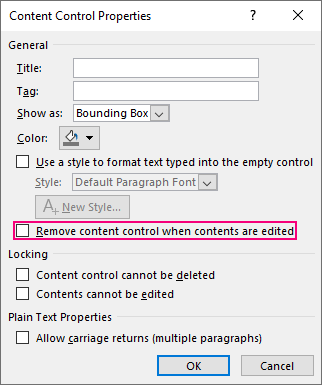
RemoveOnEdit
This parameter is optional. Define whether the content control should be removed when contents are edited using true or false. This parameter toggles this check in the properties of the content control:
Functionality to delete content
CMD
<Cmd case="BaseExtensions:delete-content" type="xx" identifier="xx"/>
Parameters
type
row
Removes table rows which contain the identifier. Works in both Word and PowerPoint.
column
Removes table columns which contain the identifier. Works in both Word and PowerPoint.
cell
Removes content from cells which contain the identifier. Works in PowerPoint.
table
Removes entire tables which contain the identifier. Works in both Word and PowerPoint.
table-title-rows
SPECIFIC: Removes entire tables where table's title match the identifier. Works in Word. Add parameter AmountOfRows to define a number of rows. Command will only delete tables that contain amount of rows that are less than or equal to defined number of rows.
bullet-point
Removes bullet-points which contain the identifier. Works in both Word and PowerPoint.
shape
Removes shapes which names are equal to the identifier. Works in both Word and PowerPoint.
shape-contains
Removes shapes which names contain the identifier. Works in both Word and PowerPoint.
master-shape
Removes shapes from the slide master which names contain the identifier. Works in PowerPoint.
slide
Removes slides which contain a shape that is named as the identifier. Works in PowerPoint.
slide-name
Removes slides which slide name contain the identifier. Use VBA to set the name of the slide. Works in PowerPoint.
To open VBA editor, press ALT + F11 inside PowerPoint. From here, you can use the following commands to inspect and and set the name of the currently selected slide:
//Sets the slide name
Application.ActiveWindow.Selection.SlideRange(1).Name = "SlideName"

//What is slide name?
?Application.ActiveWindow.Selection.SlideRange(1).Name
layout
Removes layout which name contains the identifier. Works in PowerPoint. Note that PowerPoint does not allow layouts to be deleted if they are in use.
slide-master
Removes the slide master which name is equals to the identifier. Also removes all slides using layouts from that slide master.
content-control
Removes content controls where the content contain the identifier. Works in Word.
content-control-title
Removes content controls where the title of the content control contain the identifier. Works in Word.
content-control-title-cc
Removes content controls only if they have no content in any nested content controls. Works in Word.
content-control-table-row
VERY SPECIFIC: Removes a row within a table, where the table is within a CC. The identifier is the name of a CC that is within a cell for the row you need to delete. It only works if the style for the CC (identifier), that is within the row, has hidden text enabled.
bookmark
Removes bookmarks if the name of the bookmark is identical with the identifier. This can be used to delete bookmarks with or without content. To do this, add the parameter keep-content in the command and define to be either true or false. If true, the command will delete the bookmark but not the content. If false, the command will delete the content of bookmark too. Works in Word.
document-property
Removes document properties where the name of the document property is defined in the identifier. Works in Word and PowerPoint..
hyperlink
Removes hyperlinks in word documents. In this case the identifier is the story range of the word document that the hyperlinks should be removed from A list of these can be found here.
identifier
Define the identifier that indicates what text the type of content should contain in order to be considered as removable, e.g. "test". It is also possible to insert multiple identifiers separated by a comma, e.g. "test1,test2,test3".
It is also possible to remove content controls after startup using prefixes and document properties, which can be seen in this article.
Delete multiple types and identifiers (not applicable for Word)
The delete content command supports deleting multiple types and identifiers. To do so, use the same command as above, and add the parameters below:
multipleTypes
Define parameter to be true to delete multiple types and identifiers.
type-X
The X must be replaced with a number. For instance, if you want to delete three different types of content, your command must contain three of these parameters called type-1, type-2 and type-3. In this parameter, you must define what kind of content that should be deleted, e.g. row, column or cell.
identifier-X
As above, the X must be replaced with a number that matches the number from the type. This means, if type-3 should delete rows that contain "hello", this parameter should be: identifier-3="hello".
Was this article helpful?
That’s Great!
Thank you for your feedback
Sorry! We couldn't be helpful
Thank you for your feedback
Feedback sent
We appreciate your effort and will try to fix the article