BaseExtensions can be used to apply a color style set in Word.
Module is located here:
...\ModuleLibrary\BaseExtensions\01_nocontext_Tools\29_W_applyStyleSet.xmlFeature
1) Open a new document and open the extended styles pane. Here, you are able to create a new style.
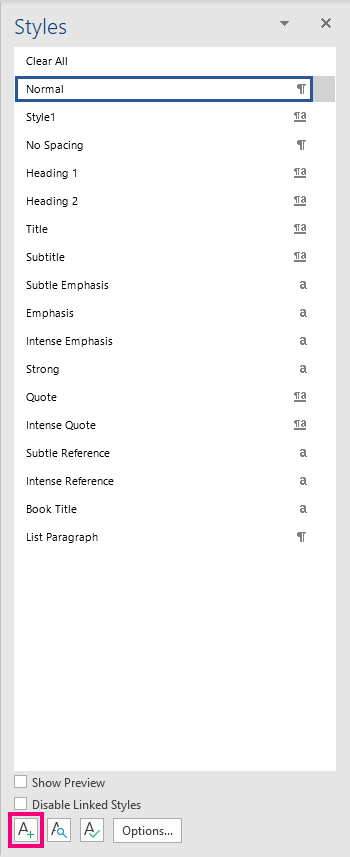
2) Go to the design tab and select a color theme.

3) Save this document as a .docx file in this folder:
...\OfficeExtensions\Content\BaseExtensions\
This folder must be defined as the path in the command. The path in the command must also contain the name of the saved document, e.g.:
%programdata%\OfficeExtensions\Content\BaseExtensions\test.docx
4) From now on, when the above-mentioned folder is defined as the path, it is possible to apply the saved color style set.
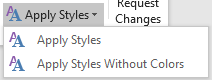
"Apply Styles" will apply both the created style set and the chosen color theme, and by that change the color of the font to the chosen color theme, while "Apply Styles Without Colors" will apply only the created style set, where the color will remain as it was created in the style set.
CMD
<Cmd case="BaseExtensions:apply-styles" path="xx" colors="xx"/>
Parameter
path
Define the path from which colors and styles must be implemented.
colors
true
If the parameter is defined to be true, it will show both the style set and the color theme chosen in the design tab.
false
If the parameter is defined to be false, it will only show the style set and not the color theme.
Was this article helpful?
That’s Great!
Thank you for your feedback
Sorry! We couldn't be helpful
Thank you for your feedback
Feedback sent
We appreciate your effort and will try to fix the article