This tool empowers the user to customize the border formatting of selected cells in a table. The feature opens an interface in which the user can set color, weight and borders.
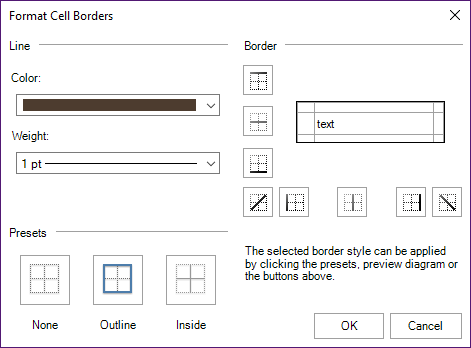
CMD
<Cmd case="BaseExtensions:format-borders-dialog" colorPath="x"/>
Parameter
colorPath
Define the path for the .xml file where the colors concerned are present. This parameter searches for the file in the Content/BaseExtensions folder. An example:.
ApplyBlankBorders
Define whether blank borders should be applied where no borders are set using true or false. Default value is false. This parameter is only needed for PowerPoint.
Was this article helpful?
That’s Great!
Thank you for your feedback
Sorry! We couldn't be helpful
Thank you for your feedback
Feedback sent
We appreciate your effort and will try to fix the article