With BaseExtensions, we are able evaluate document version compliance and fire commands based on the result of the evaluation. This can help clients ensure that users are working in the latest version of a given template.
CMD
<Cmd case="BaseExtensions:check-version"
	TargetVersionPath="xx"
	DocPropTemplateType="xx"
	DocPropVersion="xx"
	Separator=".">
	<FullVersionMatch>
		<Cmd case="BaseExtensions:AlertOk" title="Version check" text="Full match"/>
	</FullVersionMatch>
	<MajorVersionMatch>
		<Cmd case="BaseExtensions:AlertOk" title="Version check" text="Major version match"/>
	</MajorVersionMatch>
	<NoMatch>
		<Cmd case="BaseExtensions:AlertOk" title="Version check" text="No match"/>
	</NoMatch>
	<InvalidInput>
		<Cmd case="BaseExtensions:AlertOk" title="Version check" text="Invalid input"/>
	</InvalidInput>
</Cmd>
Parameters
TargetVersionPath
The path of the .json-file where the target versions are defined. This can either be a full path like seen in the example or it can be to a path in \Content\BaseExtensions\-folder and then the path should just point to the file (including possible subfolders such as just: "targetversion.json" or "jsonfolder\targetversion.json".
DocPropTemplateType
The name of the document property that contains the template type value.
DocPropVersion
The name of the document property that contains the version value.
Separator
The separator between version and subversion values.
XML Elements
FullVersionMatch
Will run all nested commands if version and subversion of document properties matches .json file.
MajorVersionMatch
Will run all nested commands if document properties version matches and subversion does not match .json file.
NoMatch
Will run all nested commands if neither version or subversion matches .json file.
InvalidInput
The name of the element that contains commands that should be run if there has been an error in the code (invalid). This could be if it cannot find the json file, if one of the docprops with defined names exists, if the target version file does not contain a target version for the found template type, or if either the version or target version cannot be parsed correctly.
Example
Module
<Cmd case="BaseExtensions:check-version"
	TargetVersionPath="Versions.json"
	DocPropTemplateType="templatetype"
	DocPropVersion="version"
	Separator=".">
	<FullVersionMatch>
		<Cmd case="BaseExtensions:AlertOk" title="Version check" text="Full match"/>
	</FullVersionMatch>
	<MajorVersionMatch>
		<Cmd case="BaseExtensions:AlertOk" title="Version check" text="Major version match"/>
	</MajorVersionMatch>
	<NoMatch>
		<Cmd case="BaseExtensions:AlertOk" title="Version check" text="No match"/>
	</NoMatch>
	<InvalidInput>
		<Cmd case="BaseExtensions:AlertOk" title="Version check" text="Invalid input"/>
	</InvalidInput>
</Cmd>
Config file "Versions.json"
Located in the \Content\BaseExtensions-folder, it's content is:
{
"report": "2.50",
"letter": "3.01"
}
The command will evaluate the document properties listed here:
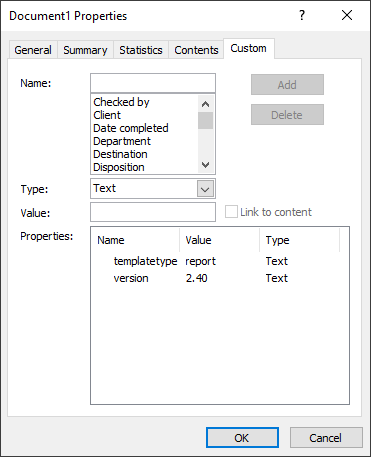
In this example the major version matches, but the subversion does not match. This means the commands nested in the <MajorVersionMatch> XML element will fire.
Was this article helpful?
That’s Great!
Thank you for your feedback
Sorry! We couldn't be helpful
Thank you for your feedback
Feedback sent
We appreciate your effort and will try to fix the article