It is possible for us to copy all custom document properties from one Word document, to another with BaseExtensions. This is done by using the command in the document which you want to copy the properties from, which opens a prompt showing what other documents you have open, which you can copy to.
CMD
<Cmd case="BaseExtensions:copy-docprops-to-docs"/>
This command has no parameters.
How to use
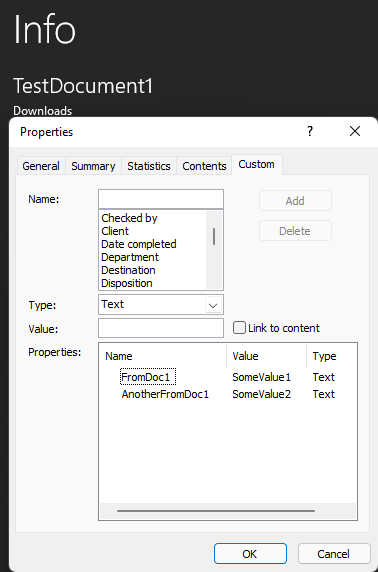
In the document in which you have custom document properties, you use the command. In the example below, we have a document called TestDocument1 which has the following custom document properties:
Using the button "Copy Document Properties" presents the following prompt
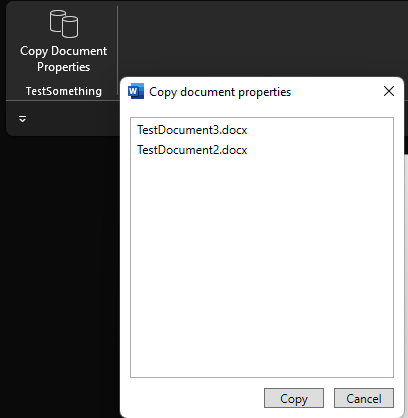
This shows a list of other documents that is currently opened. Selecting one or more of these options, will copy the custom document properties onto the selected document(s).
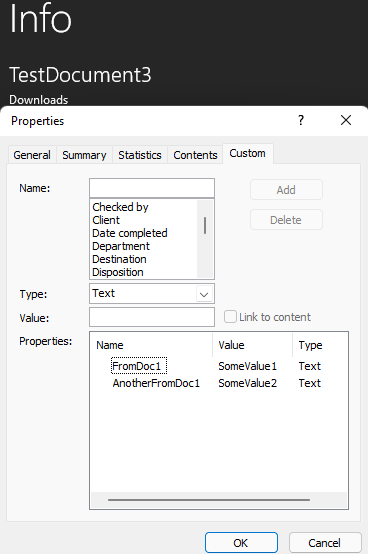
In this case, if we were to choose only "TestDocument3.docx" and then press "Copy", the properties would be copied onto there. See example below:
Was this article helpful?
That’s Great!
Thank you for your feedback
Sorry! We couldn't be helpful
Thank you for your feedback
Feedback sent
We appreciate your effort and will try to fix the article