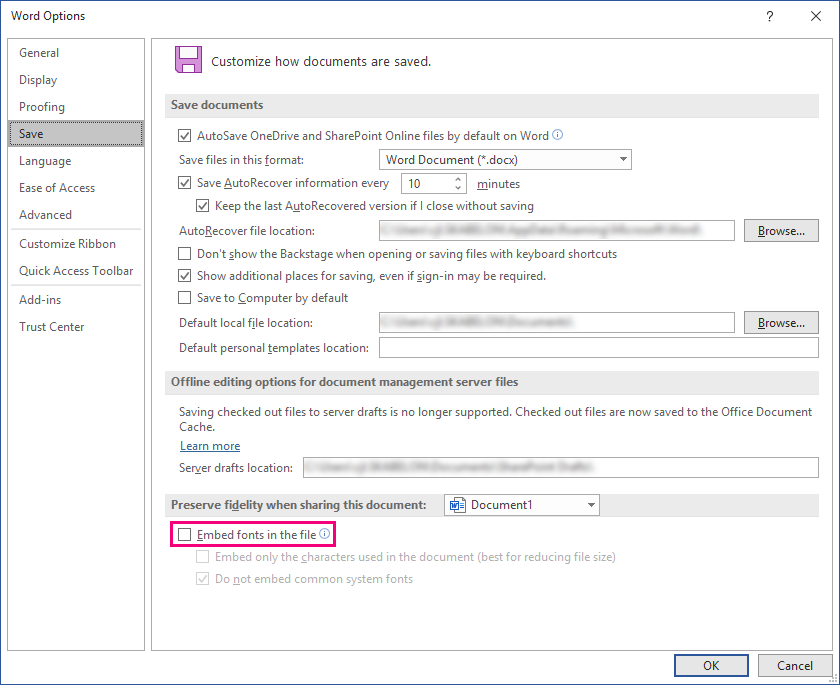
This feature is a tool for toggling whether fonts should be embedded in a document in Word or a presentation in PowerPoint. Thus, this feature must be configured as a toggle button. It will by default be set to not embed the fonts, but if the toggle button is pressed, the fonts will be embedded into the presentation or document.
Simply, it toggles the checkbox in File -> Options -> Save:
CMD
<Cmd case="BaseExtensions:embed-fonts" embed="x"/>
Parameter
embed
Define whether the fonts should be embedded using true or false.
Note that the toggle button is to be configured in two different ways for Word and PowerPoint.
Embed fonts in Word
The configuration in Word is pretty simple and can be done by following the logic for creating a toggle button, since there must be a true element and a false element in order to achieve the toggle functionality.
<ToggleButton label="Embed fonts" pressed="BaseExtensions:any" pressed-1-type="embedfonts" showInPowerPoint="false" showInExcel="false">
  <True>
    <Cmd case="BaseExtensions:embed-fonts" embed="true"/>
  </True>
  <False>
    <Cmd case="BaseExtensions:embed-fonts" embed="false"/>
  </False>
</ToggleButton>
Embed fonts in PowerPoint
The configuration in PowerPoint is a bit more complex. Firstly, the toggle button must be in a DynamicMenu, as it takes some time to check, and thus it will affect the performance in PowerPoint if the button is not in a DynamicMenu. Further, both an enable type and pressed type are to be used in the toggle button. The enable type FILELOCALACCESSIBLE checks whether the file is accessible in the local file system, which is required since we close the file, change it and then open it again. The pressed type SLOWPPFONTEMBED checks whether it is embed fonts. This requires the file to be available (hence the enable type).
<DynamicMenu label="Options" showInWord="false" showInExcel="false" >
  <ToggleButton label="Embed fonts" enable="BaseExtensions:any" enable-1-type="FILELOCALACCESSIBLE" pressed="BaseExtensions:any" pressed-1-type="SLOWPPFONTEMBED">
    <True>
      <Cmd case="BaseExtensions:embed-fonts" Embed="true"/>
    </True>
    <False>
      <Cmd case="BaseExtensions:embed-fonts" Embed="false"/>
    </False>
  </ToggleButton>
</DynamicMenu>
Was this article helpful?
That’s Great!
Thank you for your feedback
Sorry! We couldn't be helpful
Thank you for your feedback
Feedback sent
We appreciate your effort and will try to fix the article