BaseExtensions can be used to insert field codes in Word. For instance, this can be used to create an appendix functionality, where the user is able to insert appendix references, change the number for the appendix references or create an appendix list.
This is a great tool for easily inserting references in a document. This article will elaborate on the different commands in terms of using them to create an appendix.
Contents
Create a field
The following command creates a content control with text inside. Inside the command, we must define elements for the content that should be inserted.
<Cmd case="BaseExtensions:InsertWordContent" style="x"></Cmd>
Parameters
style
Define the name of the style or WdBuiltinStyle enum.
group
Define the name of the content control surrounding the content. This parameter is optional. If it is empty or omitted, the content control will be removed after insertion, but content will be kept.
moveEnd
Define whether the cursor should be moved to the end using true or false. If defined to false, the cursor will end immediately to the right of inserted content. Default is true, which will move the cursor one further character space to the right.
Elements
<Text></Text>The <Text> element must contain the text that should be inserted.
<CountField></CountField>We support a continuous count and result field. This element has two parameters:
Set
Sets the total name of the field.
Seq
Sets the sequence counter.
<Field></Field>The <Field> element contains the field code that is inserted.
Example of a simple appendix reference
<Cmd case="BaseExtensions:InsertWordContent" group="Appendix" style="Appendix">
   <Text>Appendix</Text>
   <CountField Set="TotalAppendix" Seq="CountAppendix"/>
   <Field>SEQ Appendix \n \*ARABIC</Field>
</Cmd>
Example of an expanded appendix reference
<Cmd case="BaseExtensions:InsertWordContent" group="Appendix" style="Appendix">
    <Text>Appendix</Text>
    <CountField Set="TotalAppendix" Seq="CountAppendix"/>
    <Field>STYLEREF \*HEADINGNUMBER \S</Field>
    <Text>.</Text>
    <Field>SEQ Appendix \n \*ARABIC</Field>
</Cmd>
Example of a TOC reference
Include a command to select and clear a content control in the document, then insert a TOC field.
<Cmd case="BaseExtensions:select-named-cc" name="Table of Contents" clear="true"/>
<Cmd case="BaseExtensions:InsertWordContent" Style="wdStyleNormal,~Normal" moveEnd="true">
    <Field>TOC \o "1-1" \h \z \t"</Field>
</Cmd>
Regional list separator independency
Some field codes utilize list separators in to segment the code. The separator symbol can vary from system to system, depending on the regional setting, which can be accessed by hitting the Windows key + R and then run intl.cpl before clicking "Additional Settings".
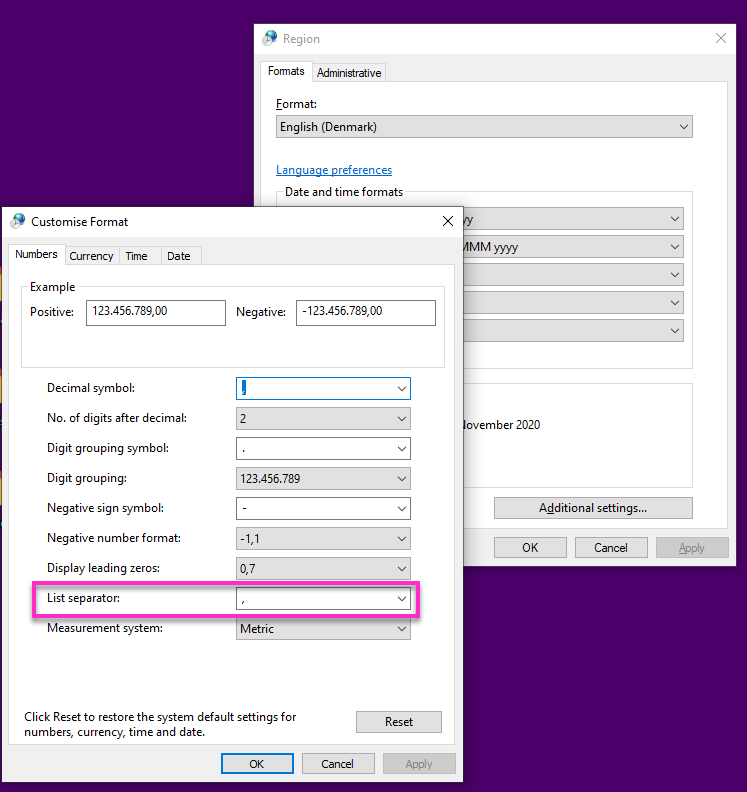
When configuring this command, we are able to generate the field code based on the regional setting. To do so simply, add a "\" before any list separator in the field code you are trying to insert.
Change fields
The following command changes all fields that match the beginning of their field code with thee when parameter.
<Cmd case="BaseExtensions:ChangeFieldWhen" when="x" first="xx" rest="xx"/>
Parameters
when
Matches all fields that start with this field code.
first
Replaces the first field that match with this field code.
rest
The rest of the fields will have this field code applied.
Example of usage
<Cmd
    case="BaseExtensions:ChangeFieldWhen"
    when="SEQ Appendix \n"
    first="SEQ Appendix \r \*STARTNUMBER \*ARABIC"
    rest="SEQ Appendix \n \*ARABIC"
/>
If first contains \*STARTNUMBER, it will prompt for number.
Regional list separator independency
The ChangeFieldWhen command also supports the region list separator functionality as described above.
Create table of content controls
The command below creates a table of all content controls with the name defined.
<Cmd case="BaseExtensions:CreateTableOfContentControls" ccName="xx"/>
Parameters
ccName
Define the name of the content controls to include in the table of content controls.
bookmark
Define the name of the bookmark where the table should be inserted at.
tableDesignName
Define the name of the table design to be applied.
firstColumnWidth
Define the width of the first column set in points. If nothing is defined, it will be default width.
firstColumnBold
Define whether the first column should be bold using true or false.
tableCellsStyleName
Define the name of the style or WdBuiltinStyle that should be applied to each cell in the table. If nothing is defined or the parameter is omitted, it will not apply a style.
Example of usage
An example of usage could be firstly to prompt the user with a dialog that asks the user whether the table of content controls should be created. If the user selects "OK", we update all fields to ensure that their references are up to date, and then the table of content controls will be created.
<Button label="Test">
    <Cmd
        case="BaseExtensions:PromptCancelBreak"
        title="Update fields and remove existing table"
        text="Note that this is the text and will XYZ... Are you sure you want to continue?"
    />
    <Cmd case="BaseExtensions:update-fields"/>
    <Cmd
        case="BaseExtensions:CreateTableOfContentControls"
        ccName="Appendix"
        bookmark="bmAppendixList"
        tableDesignName="Without line"
        firstColumnWidth="99.25"
        firstColumnBold="true"
        tableCellsStyleName="AppendixList"
    />
</Button>
Was this article helpful?
That’s Great!
Thank you for your feedback
Sorry! We couldn't be helpful
Thank you for your feedback
Feedback sent
We appreciate your effort and will try to fix the article