This is a tool for inserting an average line into a chart. The feature presents the user with a dialog where the user manually specify the average line. Here, the user is able to insert the data point of where the line should be placed in the chart.
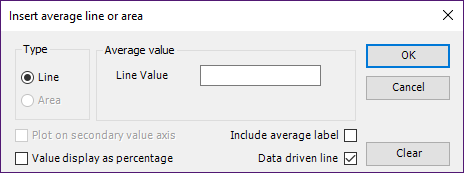
CMD to insert average line
<Cmd case="BaseExtensions:average-line"/>
Parameters
fontSize
Define the font size for the average label text, e.g. "10".
fontName
Define the font name for the average label text, e.g. "Arial".
weight
Define weight of the average line, e.g. "1.5".
lineColor
Define the color of the average line using RGB.
fontColor
Define the color of the average label text using RGB.
dashType
Define the dash style with a number from this link, e.g. "7".
applyThousands
Define the be true if the command should apply thousands separators at the average line.
CMD to delete average line
<Cmd case="BaseExtensions:average-line-delete-all"/>
CMD to reposition average line
If the average line or the label of the average line has been moved in the chart, this command will reposition the line. This will not work on data driven lines.
<Cmd case="BaseExtensions:average-line-reposition-all"/>
Use the same parameters as in the command to insert an average line to define font, weight, colors and dash type.
CMD to define default average line
The following command is to be used in solutions that have a button to apply "default format" to charts as well as the functionality to add average line. With this command, we can define the default format of the average line.
<Cmd case="BaseExtensions:average-line-default-format"/>
Use the same parameters as in the command the insert an average line to define weight and colors.
Was this article helpful?
That’s Great!
Thank you for your feedback
Sorry! We couldn't be helpful
Thank you for your feedback
Feedback sent
We appreciate your effort and will try to fix the article