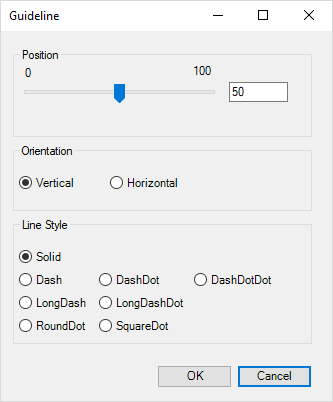
CorporateCharts can be used to insert an index line in a chart. If the position is not
Module is located here:
...\ModuleLibrary\CorporateCharts\01b_nocontext_Chart Elements
CMD
<Cmd case="CorporateCharts:guideline" style="xxx" color="xx,xx,xx"/>
Parameters
style
Define the style of the index line. We support the following:
- solid
- dash
- dashdot
- dashdotdot
- longdash
- longdashdot
- rounddot
- squaredot
color
Use RGB to set the color of the index line. Be sure to use commas and not dots.
line-width
Input width, e.g. "0,25".
orientation
horizontal
Formats the orientation to horizontal.
vertical
Formats the orientation to vertical.
pos
Input number for positioning, e.g. "50" and the index line will be placed in the middle.
When making use of the parameters "orientation" and "pos" the command will insert an index line immediately in the chart. If not, the command will open a guideline, where it is possible to set both position, orientation and line style.
Was this article helpful?
That’s Great!
Thank you for your feedback
Sorry! We couldn't be helpful
Thank you for your feedback
Feedback sent
We appreciate your effort and will try to fix the article