It is important that hyperlinks and bookmarks of the Ref type (Word only) are accessible to make them recognizable by users of keyboard and assistive technology. Therefore, it is necessary to add an alternative text to make sure that screen readers are able to read it out loud instead of reading a hyperlink or bookmark name.
In the image below, a screen reader would only be able to read the hyperlink for the user.
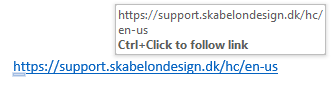
Thus, it is important to add an alternative text to enable the screen reader to read a description of a certain hyperlink or bookmark. Here is an example:
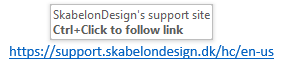
Accessibility Assistant also offers the option of setting annotation text as alternative text on all hyperlinks and bookmarks in the document not already considered solved by Accessibility Assistant.
When writing alternative text, strive to be informative, not poetic, and remember that brief is better. Use complete sentences with proper punctuation and check your spelling. Do not include any information that is already present in the caption.
Was this article helpful?
That’s Great!
Thank you for your feedback
Sorry! We couldn't be helpful
Thank you for your feedback
Feedback sent
We appreciate your effort and will try to fix the article