This feature makes it possible for you the place the data labels in a chart.
Data Labels feature
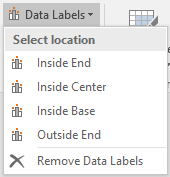
With this feature, you are able to select a location for the data labels in your chart. You can choose the data labels to be inside and in the end of column, inside and in the center of the column, inside and in the base of the column, or outside and in the end of the column. Furthermore, you are able to remove the data labels.
Requirements
For technical requirements read more about the Office Extensions platform.
Compatible: Office 2013/2016/365 (32/64bit).
Contact
Contact us for further help via the form at omnidocs.com/support.
Was this article helpful?
That’s Great!
Thank you for your feedback
Sorry! We couldn't be helpful
Thank you for your feedback
Feedback sent
We appreciate your effort and will try to fix the article