Acadre is an electronic case and document management system (ESDH) that is used by a plethora of our clients from the public sector, as it covers their need to optimize processes within case and document management, journaling, and archiving.
We have created an integration between Templafy and Acadre, that can be used to fetch data from Acadre and insert it into Templafy.
Acadre: An Overview
Firstly, in order to access Omnidocs' own Acadre server for testing the following link should be used: http://192.168.18.161:8083/Frontend/CM. It can only be accessed from the office and the following credentials need to be used:
Username: acadre
Password: acadre312
On the home page of Acadre, it is possible to access different cases, create new cases, or create new documents based on a case.
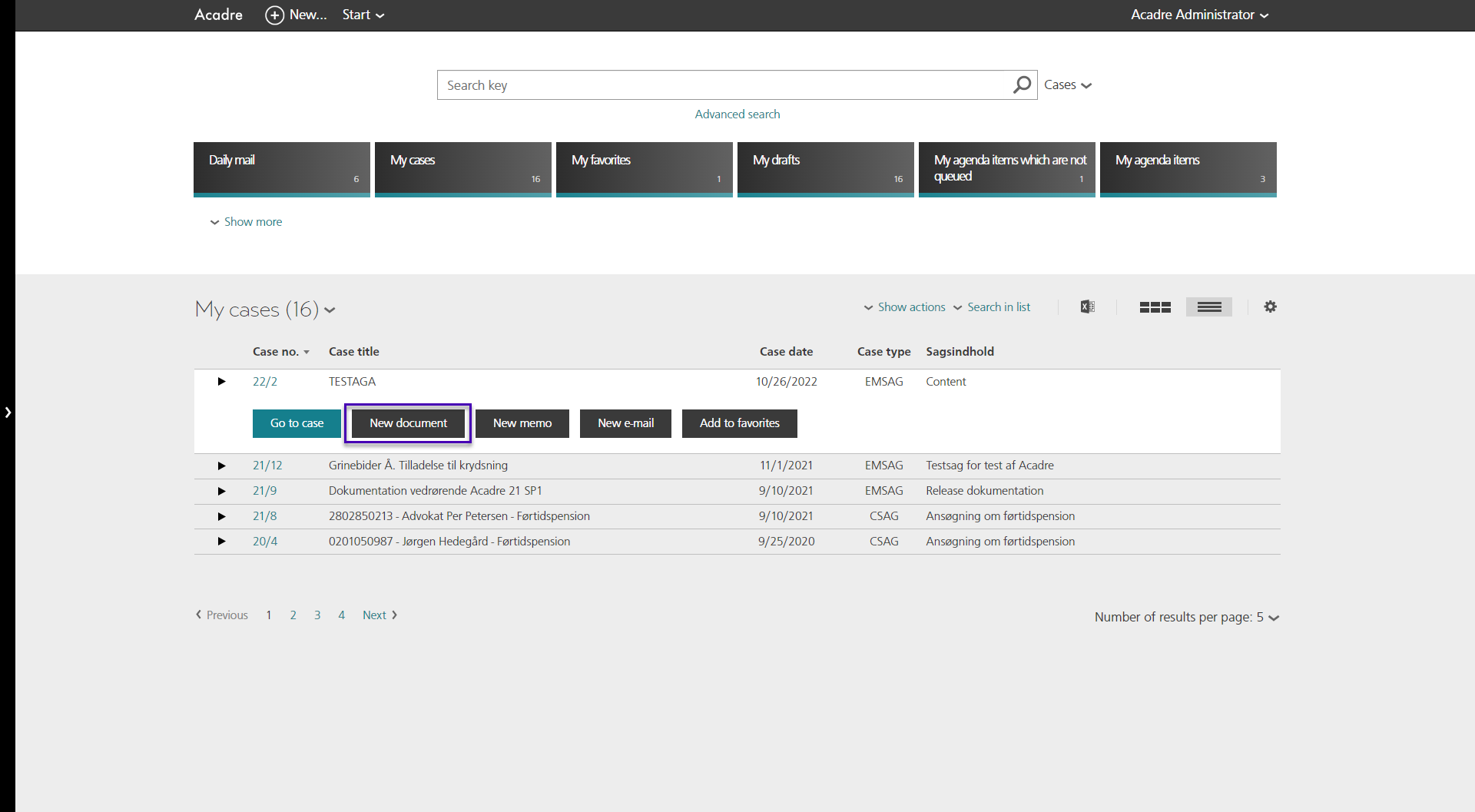
When creating a new document in Acadre, it is possible to create it based on a template, or without a template.
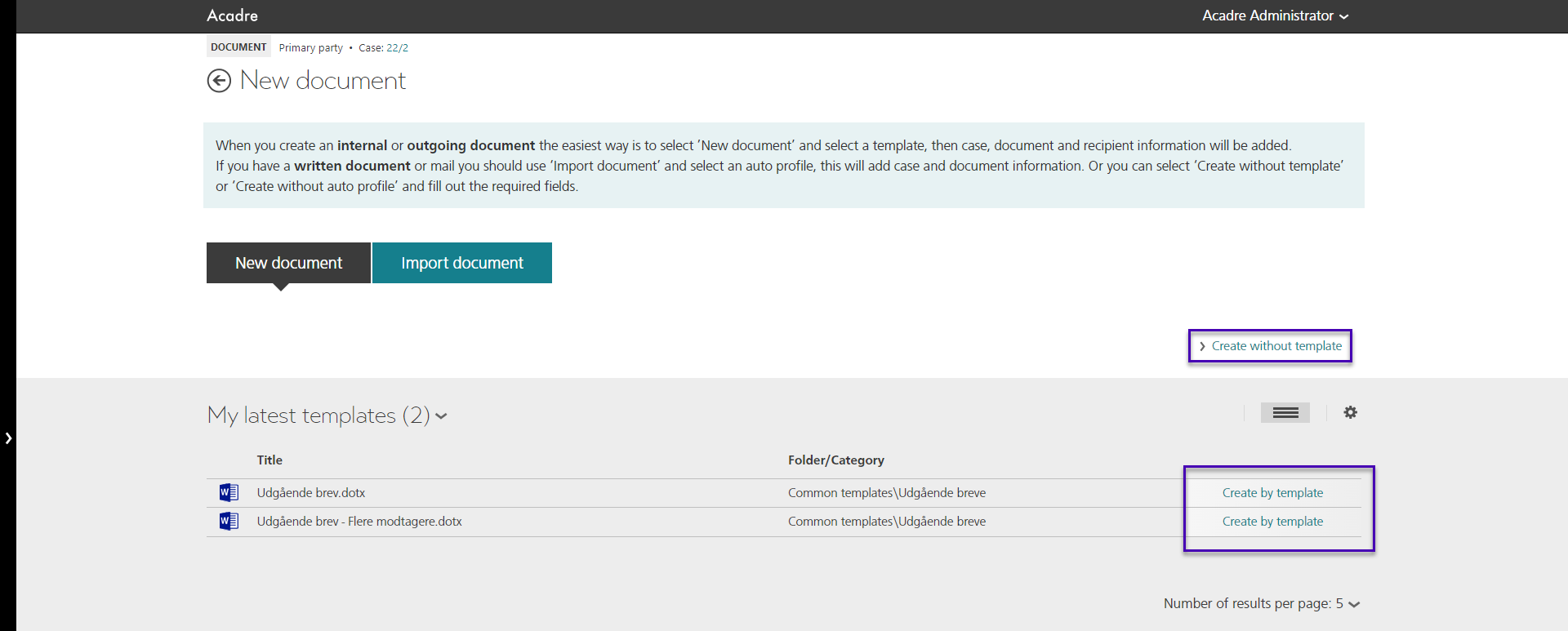
It is worth mentioning, that when a template is used for the creation of a new document, the template should not contain the "TemplafyExternalSystem" document property. This property has been used in the old integration, but in the upgraded one it is redundant and it will only trigger the DMS flow an additional time, which might lead to a pop-up error.
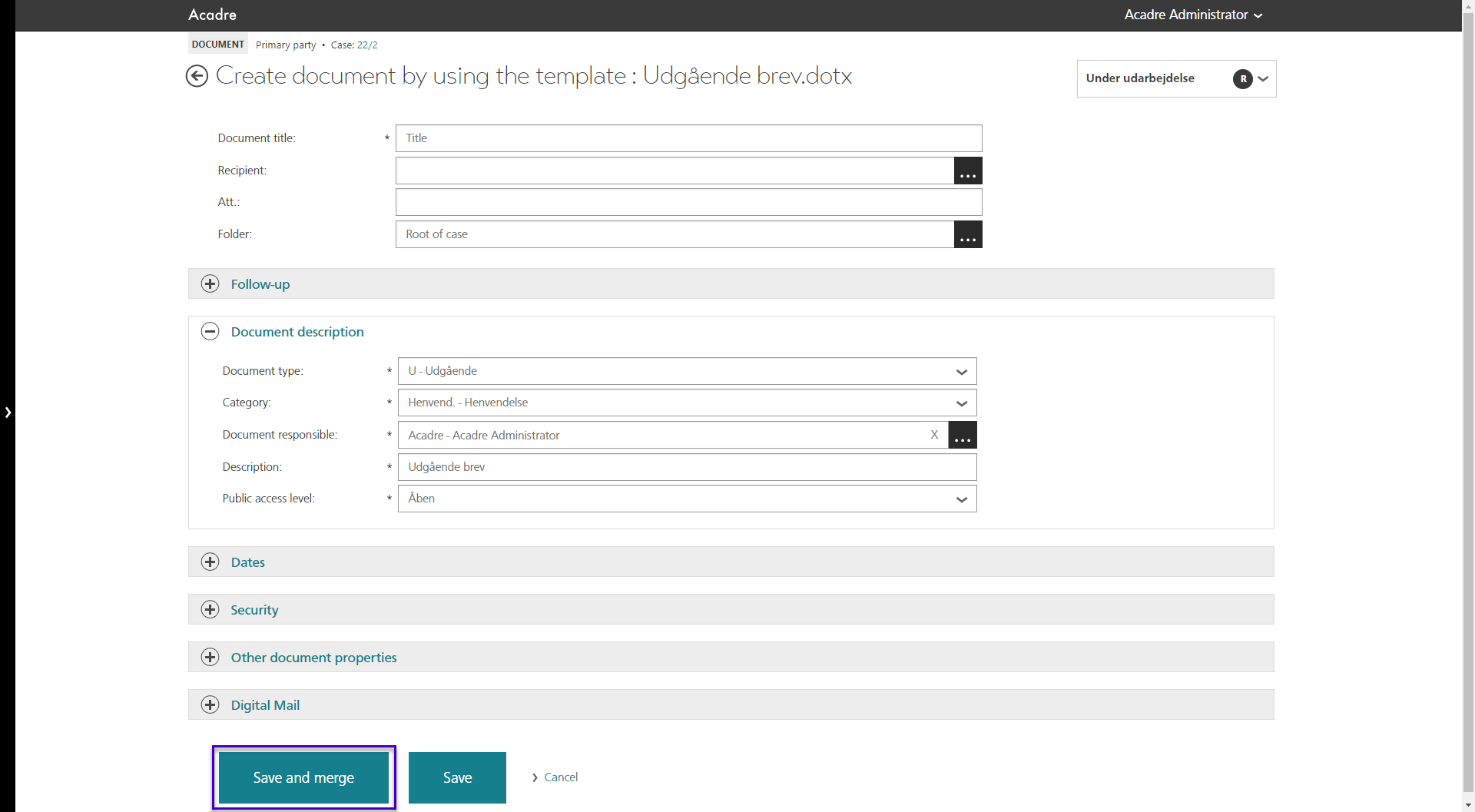
Afterwards, different data can be added to the document. This data is stored in Acadre, and that is the data that is then merged into Templafy. Once the document is ready to merge, "Save and merge" can be chosen. Alternatively, the document can be saved in Acadre by pressing "Save", and by pressing "Edit Content" the document can be sent for merging
The Integration
The plugin for the integration can be found in D:\Git\SD.Installers\AlloyPlugins\RawPlugins while main command behind the integration is the following:
<Cmd case="Omnidocs.TemplafyDms:insert-from-dms">The parameters below need to have a value in order for the integration to work:
UseTemplafyOne
This parameter should be set to true whenever the integration is used for Templafy One. If the integration is used for Templafy Hive, this parameter can be omitted.
AcadreBaseUrl
Here the link to the Acadre server that is being used is defined.
FieldMapFileName
This should point to the .xml file that remaps the information from Acadre into data suitable for Templafy. Usually, this is set to "%contentfolder%\KeyReplacements.xml".
BypassDmsCheck
This parameter can be set to either true or false. If set to false, then the "AcadreDmsEnabled" document property must be present in the document/template. When set to true, it will run the flow on all documents.
DataSourceType
In this case, this parameter should be set to AcadreApi
For Templafy Hive, the parameters TemplafyEndpoint, ExternalSystemType and SettingId need to be included as well.
The first one should point to the tenant using https://TENANTNAME.templafy.com/library/documents as its value. The values for the other two parameters can be retrieved in the Integrations tab in the tenant's Admin Settings. After pressing the View details button in the corresponding App Connector, the Popup URL can be found.
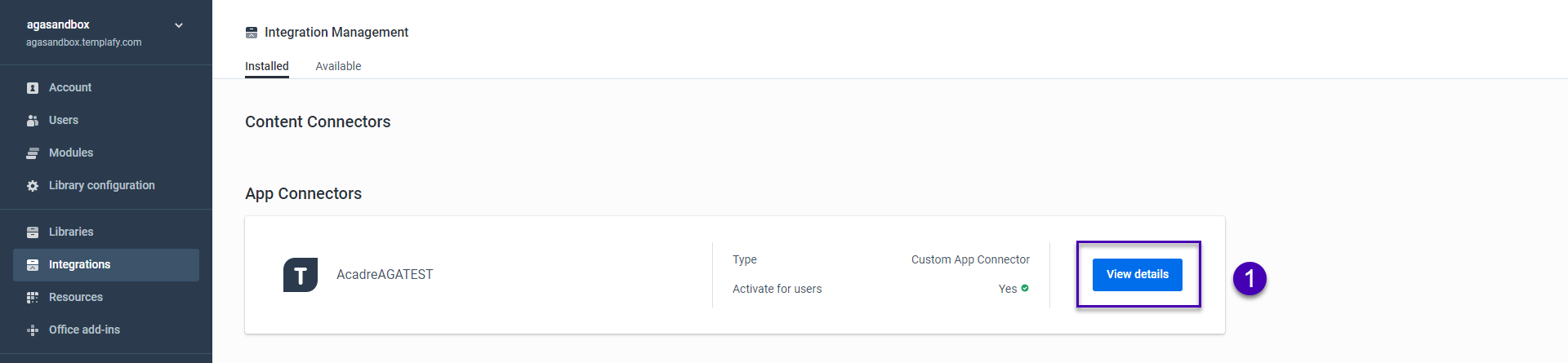
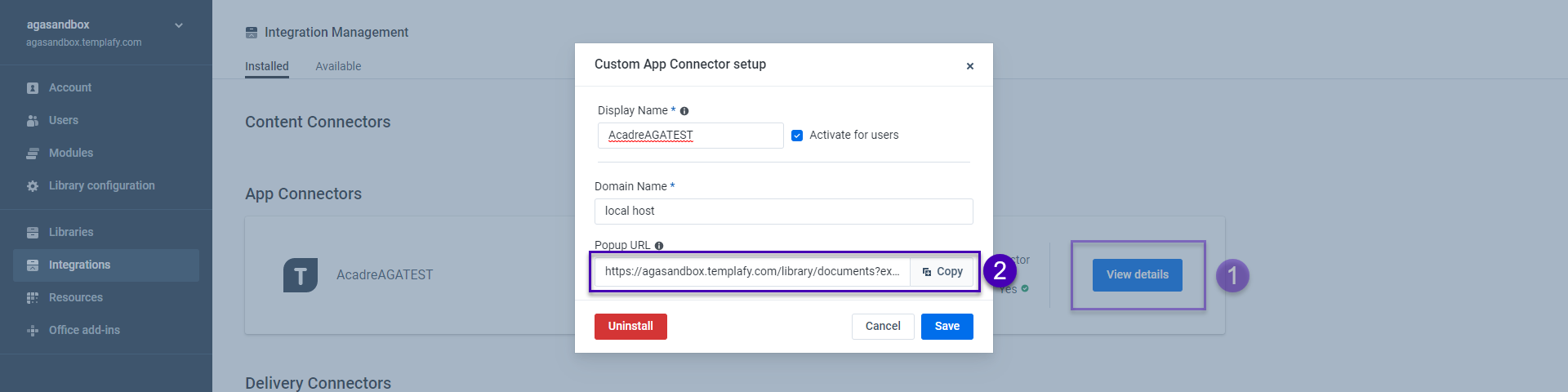
Copying the link and pasting it into a text editor (fx. Notepad, Notepad ++, etc.) will reveal the values for the ExternalSystemType and SettingId parameters.

Module Example
For Templafy One:
<button label="Api Templafy One">
    <Cmd case="Omnidocs.TemplafyDms:insert-from-dms"
        UseTemplafyOne="true"
        AcadreBaseUrl="http://192.168.18.189:8083/"
        FieldMapFileName="%contentfolder%\KeyReplacements.xml"
        BypassDmsCheck="true"
        DataSourceType="AcadreApi">
    </Cmd>
</button>
For Templafy Hive:
<button label="Api Templafy One">
    <Cmd case="Omnidocs.TemplafyDms:insert-from-dms"
        TemplafyEndpoint="https://suchhive.templafy.com/library/documents"
        ExternalSystemType="genericAppConnector"
        SettingId="637707488065432810"
        AcadreBaseUrl="http://192.168.18.189:8083/"
        FieldMapFileName="%contentfolder%\KeyReplacements.xml"
        BypassDmsCheck="true"
        DataSourceType="AcadreApi">
    </Cmd>
</button>
Remapping the data
In order to translate the data that is fetched from Acadre, we are using a .xml file that translates their keys. This file is called KeyReplacements.xml and is usually placed within the Content folder (it can be placed in a folder within the Content folder as well). The configuration of this file looks like this:
<docRoot>
    <remap>
        <InputName>CFCase_BOM__Aktuel__Sagsstatus</InputName>
        <OutputName>TestKey</OutputName>
    </remap>
    <remap>
        <InputName>MatrikelArt</InputName>
        <OutputName>TestKey</OutputName>
    </remap>
    <remap>
        <InputName>ToActivityContactJOINEXAddress</InputName>
        <OutputName>TestKey</OutputName>
    </remap>
    <remap>
        <InputName>DossierCaseNo</InputName>
        <OutputName>TestKey</OutputName>
    </remap>
    <remap>
        <InputName>AcadreUserName</InputName>
        <OutputName>LeftName</OutputName>
    </remap>
    <remap>
        <InputName>AcadreCaseTitle</InputName>
        <OutputName>Casetitle</OutputName>
    </remap>
    <remap>
        <InputName>AcadreDocumentTitle</InputName>
        <OutputName>Documenttitle</OutputName>
    </remap>
    <remap>
        <InputName>AcadreCaseDate</InputName>
        <OutputName>ClosingDate</OutputName>
    </remap>
    <remap>
        <InputName>AcadreCaseResponsibleUserInitials</InputName>
        <OutputName>PoBox</OutputName>
    </remap>
</docRoot>
The above mapping is the one that can be used in combination with Omnidocs' Acadre server, but for client integrations, the Input and Output names should be provided by the client.
In the InputName, the Acadre key name is defined, while in the OutputName, the name that is for Templafy is defined.
Response example from Acadre
<ArrayOfMergeField xmlns:i="http://www.w3.org/2001/XMLSchema-instance" xmlns="http://schemas.datacontract.org/2004/07/Acadre.Web.FrontEnd.Areas.Api.V7.Models.Document">
    <MergeField>
        <Children i:nil="true"/>
        <Name>AcadreUserId</Name>
        <Options>None</Options>
        <PreviousName/>
        <Value>1</Value>
    </MergeField>
    <MergeField>
        <Children i:nil="true"/>
        <Name>AcadreUserName</Name>
        <Options>None</Options>
        <PreviousName>Acadrebruger</PreviousName>
        <Value>Acadre Administrator</Value>
    </MergeField>
    <MergeField>
        <Children i:nil="true"/>
        <Name>AcadreUserInitials</Name>
        <Options>None</Options>
        <PreviousName>Acadrebrugerini</PreviousName>
        <Value>Acadre</Value>
    </MergeField>
</ArrayOfMergeField>
Was this article helpful?
That’s Great!
Thank you for your feedback
Sorry! We couldn't be helpful
Thank you for your feedback
Feedback sent
We appreciate your effort and will try to fix the article