Field
Inserting and modifying text
Introduction
A common use of Create Classic is inserting textual data into recipes. With the field binding, you can add text that matches the formatting of the paragraph it is inserted into.
Field binding overview
The Field binding replaces the content in binding with the string or number in the data that it is referencing. The binding is removed from the output document, if the path doesn’t exist or no value exists.
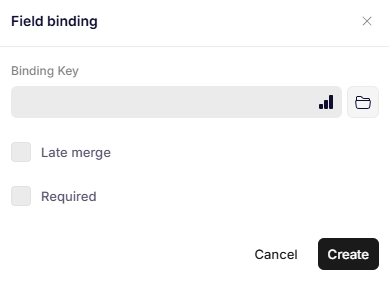
When adding a Field binding in a recipe through the binding editor, the following dialog is shown:
Field binding
Parameters
Binding Key
A path to a string or number from the data set to insert inside of the binding.
Late merge
When enabled, the binding is not resolved during the initial document generation. Instead, the binding is resolved afterwards through a separate call to a separate endpoint.
Required
When enabled, the binding key must be present in the data payload sent to the endpoint that resolves late merge bindings.
Using multi select with field bindings
If you have a list of texts that you want to insert into a field binding, for example when you have a select field with multi select enabled, you need to wrap the field binding in a repeat binding.
Was this article helpful?
That’s Great!
Thank you for your feedback
Sorry! We couldn't be helpful
Thank you for your feedback
Feedback sent
We appreciate your effort and will try to fix the article