BaseExtensions can be used to change a table of content in Word. Here, the user is able to change text in a multilevel list. This means, the user will be able to specify a multilevel list to consist of specific content and change the style. The list can also be removed from the specified style.
Module is located here:
...\ModuleLibrary\BaseExtensions\04_nocontext_MISC\05_W_changeTableOfContent.xmlHow does it work?
1) Define your new list in the document and link the first level to a specific style. You can either create your own or use built in ones. It is important to do this as the feature will only work when first level of list is linked to the same style as in the command.
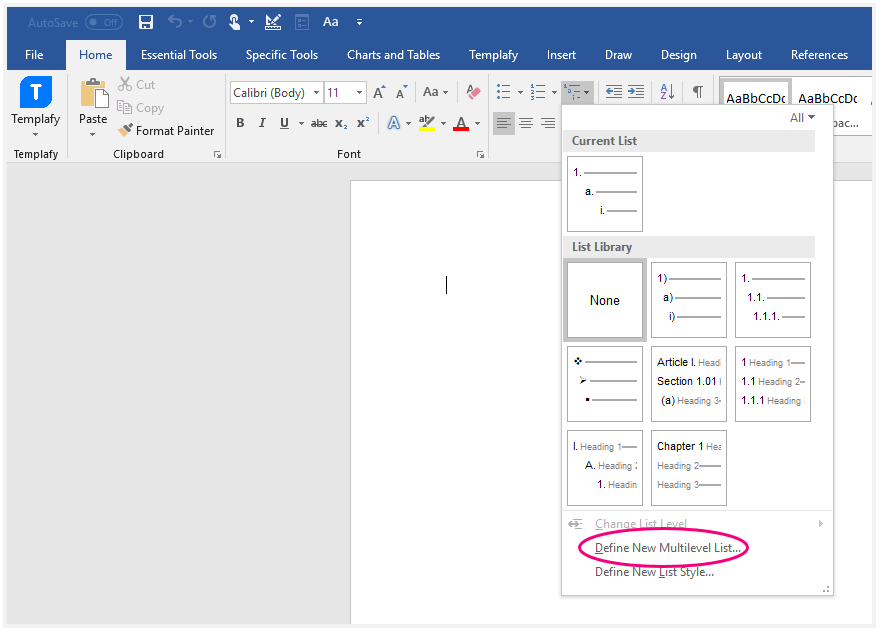
2) To link the first level of your list to the specific style, go the built in "Multilevel List" and choose "Define New Multilevel List".
3) Click at "More >>". Select first level to modify and link this level to the style you refer to in the command.
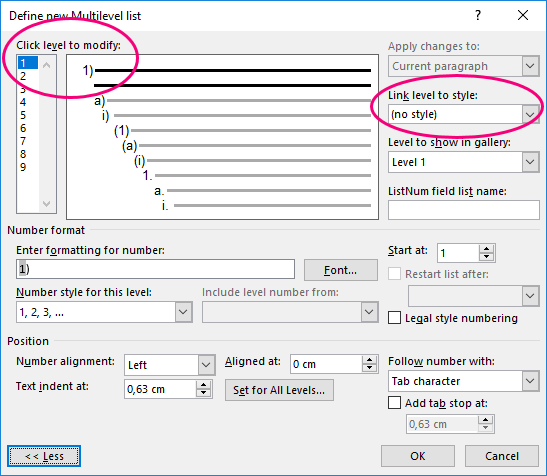
4) Now, the first level is linked to style. When clicking at the button, the feature will change the text in the list to what you have defined in your command.
Configuration
Add numbered list to a specified style
CMD: <Cmd case="BaseExtensions:change-multilevel-list"/>
Parameters:
numberFormat
Define a number for the element in the multilevel list and start with %, e.g. "%1.)".
linkedStyleName
Define the name of style that the multilevel list will be linked to. You can either create your own or use the build in ones from this list.
level-index
Define the level in the multilevel list to be modified, e.g. "1".
tabstop
This parameter is optional. Define the tab distance when pressing tab inside the style text.
Change TOC style
CMD: <Cmd case="BaseExtensions:change-toc-style"/>
Parameters:
style
Define the name of style in the table of content. You can either create your own or use the build in ones from this list.
change
Define whether the command should set or delete tab stop and hanging indent.
tabstop
This parameter is optional. Define a list of numbers that specify the tab stops, e.g. "2.4,5.7,11.3".
hanging
This parameter is optional. Set to be true if it should set the first line hanging indent.
Remove numbered list from style
CMD: <Cmd case="BaseExtensions:remove-list-from-style" style="wdStyleHeading1"/>
Parameter:
style
Define the name of style where the list should be removed from. You can either create your own or use the build in ones from this list.
Was this article helpful?
That’s Great!
Thank you for your feedback
Sorry! We couldn't be helpful
Thank you for your feedback
Feedback sent
We appreciate your effort and will try to fix the article