BaseExtensions can be used to create commands that will load other commands from the document properties and execute them serially in an alphabetically manner. The commands that should be executed must be as a value in the document property and should use the normal XML structure as known from the modules. It can both be used as an event or as a button.
CMD
<Cmd case="BaseExtensions:docpropcmd" prefix="x"/>
Parameter
prefix
Define a prefix that matches the document property names. The command will execute all commands matching the prefix defined.
As an example, this feature can be used to change font color to blue using document properties. Notice that this is just an example - it doesn't has to be a button as it can be used as both an event or as a button.
Create a module that contains this command:
<Cmd case="BaseExtensions:docpropcmd" prefix="color"/>Now, create a document property where the name contains the defined prefix and insert the command to change font color as the value:
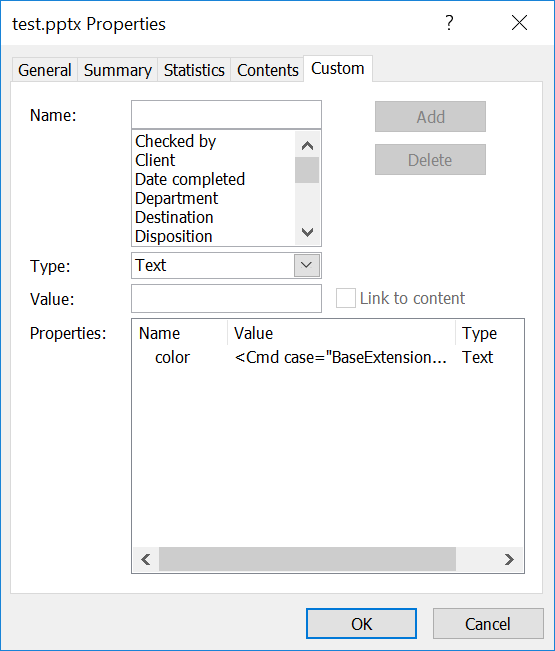
In this case, the name of the document property must contain "color" as it is set to be the prefix. The value must be <Cmd case="BaseExtensions:change-font-color" color="5,240,255"/> which is the command for changing font color to blue.
Was this article helpful?
That’s Great!
Thank you for your feedback
Sorry! We couldn't be helpful
Thank you for your feedback
Feedback sent
We appreciate your effort and will try to fix the article