This feature toggles the visibility of the formatting marks in Word, and thus enable or disable the options depended on what is defined in the command. As an example, this feature is used to enable paragraph marks while disabling hidden text.
This is the options that the feature triggers:
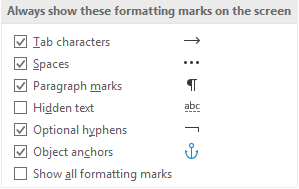
Module is located here:
...\ModuleLibrary\BaseExtensions\01_nocontext_Tools\81_showHideFormattingMarks.xmlCMD
<Cmd case="BaseExtensions:show-hide-formatting-marks"/>
Parameters
tabs
Define to be true (to enable) or false (to disable). If the parameter is omitted, it will not change this specific formatting options.
spaces
Define to be true (to enable) or false (to disable). If the parameter is omitted, it will not change this specific formatting options.
paragrahMarks
Define to be true (to enable) or false (to disable). If the parameter is omitted, it will not change this specific formatting options.
hiddenText
Define to be true (to enable) or false (to disable). If the parameter is omitted, it will not change this specific formatting options.
optionalHyphens
Define to be true (to enable) or false (to disable). If the parameter is omitted, it will not change this specific formatting options.
objectAnchors
Define to be true (to enable) or false (to disable). If the parameter is omitted, it will not change this specific formatting options.
allFormattingMarks
Define to be true (to enable) or false (to disable). If this parameter is set to true, it will enable all options no matter how these are defined. If the parameter is omitted, it will not change this specific formatting options.
Was this article helpful?
That’s Great!
Thank you for your feedback
Sorry! We couldn't be helpful
Thank you for your feedback
Feedback sent
We appreciate your effort and will try to fix the article