This feature supports setting the interval of tick marks in the selected chart in Excel. This can either be automatically set in the command or be used as a dialogue that pops up, where the interval of bottom tick marks can be defined, as well as mirror these values to the secondary axis.
Module is located here:
...\ModuleLibrary\CorporateCharts\01b_nocontext_Chart Elements\07_tickMarks.xmlCMD
<Cmd case="CorporateCharts:set-tick-marks-interval"/>
Parameters
popup
Define whether the command should open a dialogue where the intervals of tick marks can be set. If the parameter is set to be true, it will pop up the dialogue. If defined to be false, use the parameters below.
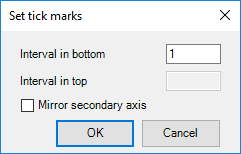
tick-marks-interval-between-marks
Define the value for tick marks interval.
labels-interval-between-labels
Define the value for labels interval.
Example of usage
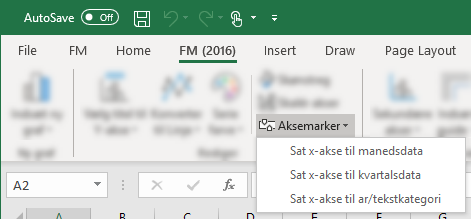
If you want to see an example of usage, take a look at Finansministeriet. Here, this feature is configured with three options:
Was this article helpful?
That’s Great!
Thank you for your feedback
Sorry! We couldn't be helpful
Thank you for your feedback
Feedback sent
We appreciate your effort and will try to fix the article