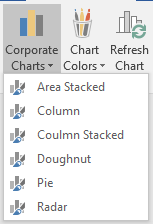
In order to prevent irrelevant chart types, it is possible to add a Document Property (Docprop), which will hide chart types in the overview.
Feature
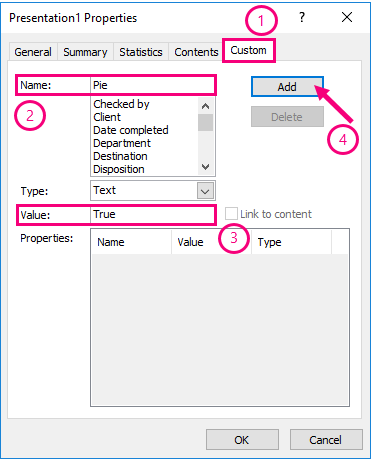
Add a DocProp by picking the (1) "Custom" tab and add a (2) name to the document property, (3) type in "true" as value and (4) click "Add".
Locate the specific chart you want to hide within ProgramData, e.g. the pie chart.
ProgramData\OfficeExtensions\Content\CorporateCharts\Pie
In the file:
config.xml
Add the following command equal to the DocProp name:
showhidedocprop=Pie
The pie chart will now be removed from the chart overview.
Was this article helpful?
That’s Great!
Thank you for your feedback
Sorry! We couldn't be helpful
Thank you for your feedback
Feedback sent
We appreciate your effort and will try to fix the article