This article will elaborate the different injected features that we have. You can use visibility options to show or hide injected features as well as define the labels.
Scroll down for quick copy/paste.
Refer to following articles to find the idMso needed including it's type:
Our injected features are located here:
...\SD.Installers\Z_AlloyPlugins\ModuleLibrary\_InjectedFeatures
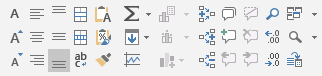
Toolbox for Excel
This toolbox consists of several features for formatting, creating charts, adding comments, zooming, etc. These works as shortcuts when, for instance, it is necessary to quickly decrease decimals.
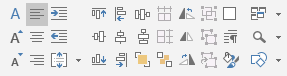
Toolbox for PowerPoint
This toolbox consists of different features for formatting text and objects, the ability to add drawing guides, paragraph settings, zooming and a quick shortcut to insert shapes.
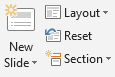
Slide Group
Injected features for slides, where it is possible to add new slide, choose layout, reset slide and format sections.
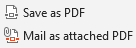
Save and Send as PDF
Injected feature that enables to save and send slide as PDF.
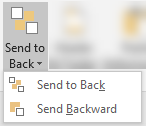
Send to Back
Injected feature that sends selected object backwards or to back.
Header & Footer
Injected feature for opening a dialog box where it is possible to apply header and footer to slide(s).

Paste Unformatted
Injected feature for pasting content without any formatting.

Group
Injected feature to join objects together to move and format then as if they were a single object.

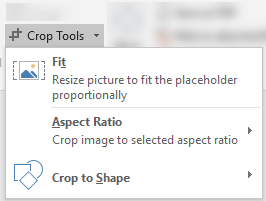
Crop
Injected feature to crop pictures. Pictures can be cropped to either a placeholder, a shape or based on selected aspect ratio.
Fit to Window
Injected feature for zooming the presentation to fit and fill the window.

Selection Pane
Injected feature that shows a list of all objects in the presentation, where they can be selected and changed due to their order and visibility.

New Document or Template
Injected feature that opens a dialog box where type of document or template can be selected.

Fit Table
Injected feature that fits selected table to page.

Other injected features
There exist many injected features which can be found here:
D:\Git\SD.Production\Ikonbibliotek\Ribbon Built-in Commands\MS-funktioner til ikonerneIn this folder, three different .xlsx files can be found (one for Excel, one for PowerPoint and one for Word).
Quick copy paste content
<!-- Boxes with all the various inject-types -->
<Inject showInExcel="false" showInWord="true" showInPowerPoint="false" showInOutlook="false">

  <box id="bxAlign6" boxStyle="vertical">
    <splitButton idMso="AutoSumMenu" showLabel="false"/>
    <menu idMso="FillMenu" showLabel="false"/>
    <button idMso="SparklineLineInsert" showLabel="false"/>
  </box>

  <box id="bxAlign6" boxStyle="vertical">
    <control idMso="FormatPainter" label=" "/>
    <toggleButton idMso="WrapText" showLabel="false"/>
    <gallery idMso="ChartDataLabel" visible="true" label=" "/>
  <box>

</Inject>
Was this article helpful?
That’s Great!
Thank you for your feedback
Sorry! We couldn't be helpful
Thank you for your feedback
Feedback sent
We appreciate your effort and will try to fix the article