We are able to locate table, row, column and cell templates in a different folder and include it in a special menu. This new root folder can be called in the special button. When this feature is used, the default tables, rows, columns and cells folders should be located inside the new root folder.
In the special button, we have added a new parameter called root, which can set another folder as our root folder. This means, if we create a new folder called sizing, this is what must be defined in the root parameter. Though, if this folder contains sub folders that should be targeted, we must define the root folder with a slash. For instance, if the sizing folder contains a folder called report, we target the folder called report by defining the root parameter as sizing\report. In such case, the folder that contains the templates (tables, rows, columns, or cells) must be inside the sub folder.
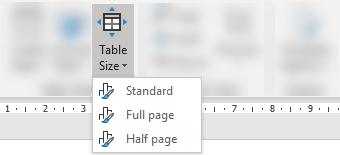
This can be used to create a button that can change the table size of selected table.
Here, we have saved a table design in the folder \sizing\tables, which consist of three variants with different table widths. This is the module that targets the table design:
<DynamicMenu label="Table Size" size="large" icon="TableResize" dependency1="SkabelonDesign.CorporateTables">
  <Button special="SkabelonDesign.CorporateTables:Table" root="sizing" icon="ChartStylesGallery">
     <Cmd case="SkabelonDesign.CorporateTables:Table" CreateFormat="Format"/>
  </Button>
</DynamicMenu>
With this module, the button will enable the user to change the table size to whatever is defined in the different options:
In another example has different table designs depending on the program. Here, we have created multiple folders for Word, PowerPoint and Excel respectively, and thus the module can target the correct folder with the correct table design using the root parameter.
Was this article helpful?
That’s Great!
Thank you for your feedback
Sorry! We couldn't be helpful
Thank you for your feedback
Feedback sent
We appreciate your effort and will try to fix the article