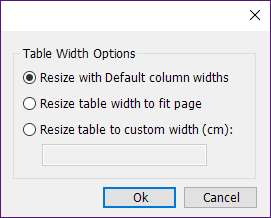
This feature is used to change the width of your tables. It opens a dialog in which the user can control table sizing of the selected table in both Word and PowerPoint. This tool provides three options;
1) Resize with default column widths. For instance, if the width of first column has been changed, this option ensures to reapply the default width.
2) Resize table width to fit page. In order to work in PowerPoint, the placeholder shape on custom layout must be called "LAYOUT BODY".
3) Resize table to custom width, which enables the user to define the width in centimetres.
Notice that all table templates should have the following parameter in the JSON, when indentation is not used. If any number is defined here, the code will impact table sizing.
"IndentationAmount": "null"
CMD
<Cmd case="SkabelonDesign.CorporateTables:TableSizing"/>
To use this command, a table must be selected.
Was this article helpful?
That’s Great!
Thank you for your feedback
Sorry! We couldn't be helpful
Thank you for your feedback
Feedback sent
We appreciate your effort and will try to fix the article