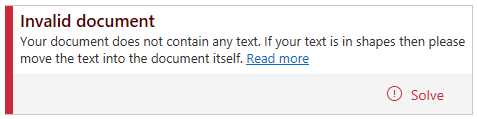
If the document contains no text, or if the only text in the document is in shapes, Accessibility Assistant will mark the document as invalid. When this is the case Accessibility Assistant will show this issue as the only issue until solved. When this has been solved, Accessibility Assistant will reevaluate the document and show all other accessibility issues, if any.
To make the document valid there has to be written text in the document. Text written in shapes will be needed to be moved out of the shapes and put into the document itself. When the document contains all the text, clicking "Solve" will reevaluate the document and it will turn green if the document is valid. Thereafter, the document is either ready for export or all other accessibility issues will be shown.
Was this article helpful?
That’s Great!
Thank you for your feedback
Sorry! We couldn't be helpful
Thank you for your feedback
Feedback sent
We appreciate your effort and will try to fix the article