This feature is a tool for inserting a index line in your chart.
Index Line feature
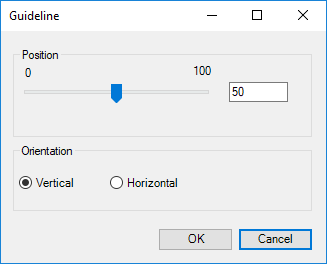
When clicking at this button, you will be able to select position and orientation of the index line. For instance, you can select a position at 50 and a vertical orientation. In this way, the index line will be placed in the middle of the chart.

Requirements
For technical requirements read more about the Office Extensions platform.
Compatible: Office 2013/2016/365 (32/64bit).
Contact
Contact us for further help via the form at omnidocs.com/support.
Was this article helpful?
That’s Great!
Thank you for your feedback
Sorry! We couldn't be helpful
Thank you for your feedback
Feedback sent
We appreciate your effort and will try to fix the article