This feature enables you to control the scale of the axes of your Corporate Charts. Note, this is only featured in Excel.

When pressing the "Scale Axes" icon in the ribbon, you will be presented with the following popup:
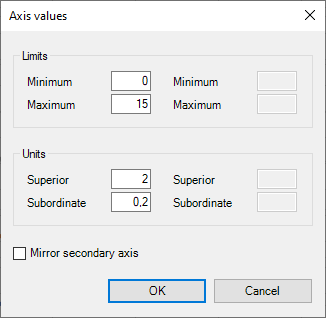
In this popup, you can set in the "limits" section, what the lower and upper bounds of the Y axis. In the "units" section, you can set what intervals the units should be displayed.
You can also use "Mirror secondary axis" to enable custom values for a secondary axis, if you have one on your chart.
Was this article helpful?
That’s Great!
Thank you for your feedback
Sorry! We couldn't be helpful
Thank you for your feedback
Feedback sent
We appreciate your effort and will try to fix the article