BrandedStartup is a tool that ensures that Word, PowerPoint and Excel will start up with the correct settings. In Word, PowerPoint and Excel, we can define colors and fonts, and in Word, we are further able to specify margins and styles.
Step-by-step guide
1. Ensure you have the latest BaseExtensions plugin from SD.Installers.
2. Clarify customer needs. Do they need all or some of the following:
- Colors
- Fonts (and font size)
- Styles (Word only)
- Margins (Word only)
- Multiple designs supported aka dynamic BrandedStartup. (in which case look under path section)
3. Place module from SD.Installers in Modules folder in SDUP.
4. Place .xml files in Content folder in SDUP, containing configuration as elaborated below.
In order to add BrandedStartup, .xml files need to be present within two folders:
...OfficeExtensions\Modules
...OfficeExtensions\Content\BaseExtensions
Modules
Within SD.Installers, locate the folder named events placed as follows:
SD.Installers\Z_AlloyPlugins\ModuleLibrary\events\
Copy the folder and place it in the Modules folder. Within the folder, a .xml named BaseExtensions is located, and is structured as follows:
<event type="BaseExtensions:BrandedStartup_Word">
    <Cmd case="BaseExtensions:WordColor"/>
    <Cmd case="BaseExtensions:WordFont"/>
    <Cmd case="BaseExtensions:WordStyle"/>
    <Cmd case="BaseExtensions:WordMargin"/>
</event>

<event type="BaseExtensions:BrandedStartup_Excel">
    <Cmd case="BaseExtensions:ExcelColor"/>
    <Cmd case="BaseExtensions:ExcelFont"/>
</event>

<event type="BaseExtensions:BrandedStartup_Power">
    <Cmd case="BaseExtensions:PowerColor"/>
    <Cmd case="BaseExtensions:PowerFont"/>
</event>
Note that you should only include relevant commands. The command cases must match the startup.xml files within the Content/BaseExtensions folder. For instance, if the client should only have fonts and colors, the commands for styles and margins should be omitted.
In the command WordStyle, we can use the parameter forceRun="true", which will apply the styles in a non-empty and not saved document:
<Cmd case="BaseExtensions:WordStyle" forceRun="true"/>In this way, we are able to run the command on any document, and not just document considered blank as previously.
Furthermore, we have a parameter that run on existing, non-empty and saved documents:
<Cmd case="BaseExtensions:WordStyle" forceRunExtreme="true"/>For instance, this is useful for clients that experience issues with their existing documents from SharePoint.
NOTE! If the styles do not react as expected, try adding the case two times in a row (crazy Word!).
Define font size (not supported for PowerPoint)
BrandedStartup supports font size. To set the font size, it should be defined directly in a parameter called size in the WordFont or ExcelFont commands in the event file in the Modules folder.
For instance, if the font size should be 16 when opening Word or Excel, write the command like this:
<Cmd case="BaseExtensions:WordFont" size="16"/>or
<Cmd case="BaseExtensions:ExcelFont" size="16"/>The font size can be a float value, e.g. 9.5. The float value must be defined with a "." and only possible floting point number is 5.
Files in Content/BaseExtensions
Within this folder, the configuration files are located.
These .xml files are named startup followed by underscore and either font, style, margins or color, and the program BrandedStartup should affect, e.g:
startup_font_word.xml
The above-mentioned example ensures an on-brand font display when Word opens.
Color
Functions possible to add within the BaseExensions folder:
startup_color_excel.xmlstartup_color_word.xmlstartup_color_power.xml
The code block below shows the structure within the above-mentioned files. Notice that in the val="xxxx" the hex color code must be listed.
<?xml version="1.0" encoding="UTF-8" standalone="yes"?>
<a:clrScheme xmlns:a="http://schemas.openxmlformats.org/drawingml/2006/main" name="Clientname">
    <a:dk1>
        <a:srgbClr val="000000"/>
    </a:dk1>
    <a:lt1>
        <a:srgbClr val="FFFFFF"/>
    </a:lt1>
    <a:dk2>
        <a:srgbClr val="464646"/>
    </a:dk2>
    <a:lt2>
        <a:srgbClr val="EDEDED"/>
    </a:lt2>
    <a:accent1>
        <a:srgbClr val="1E5569"/>
    </a:accent1>
    <a:accent2>
        <a:srgbClr val="667E85"/>
    </a:accent2>
    <a:accent3>
        <a:srgbClr val="F07F13"/>
    </a:accent3>
    <a:accent4>
        <a:srgbClr val="33545C"/>
    </a:accent4>
    <a:accent5>
        <a:srgbClr val="F8BF89"/>
    </a:accent5>
    <a:accent6>
        <a:srgbClr val="A5A5A5"/>
    </a:accent6>
    <a:hlink>
        <a:srgbClr val="1E5569"/>
    </a:hlink>
    <a:folHlink>
        <a:srgbClr val="667E85"/>
    </a:folHlink>
</a:clrScheme>
The colors will be visible within the "Design" tab as custom theme colors.
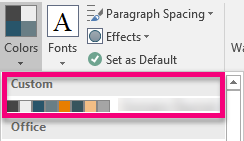
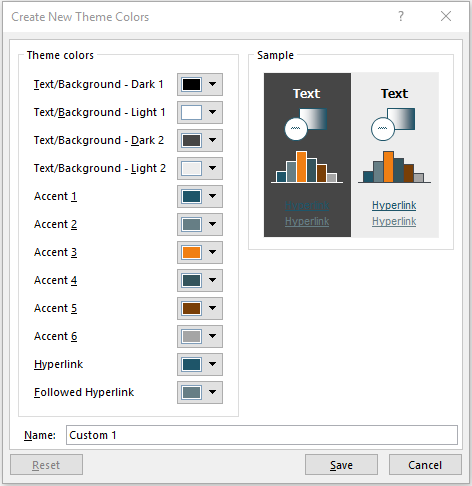
From here, you can save the particular color theme and then find it here:
%appdata%\Microsoft\Templates\Document Themes\Theme Colors
Be aware that a color theme might already exist in client solution here:
...\files\Office\UserTemplates\Document Themes
If this is the case copy the file to the Content folder and rename it appropriately.
Font
Functions possible to add within the BaseExensions folder:
startup_font_excel.xmlstartup_font_word.xmlstartup_font_power.xml
The code block below shows the structure within the above-mentioned files.
<?xml version="1.0" encoding="UTF-8" standalone="yes"?>
<a:fontScheme xmlns:a="http://schemas.openxmlformats.org/drawingml/2006/main" name="Clientname">
    <a:majorFont>
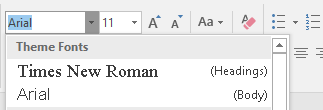
        <a:latin typeface="Times New Roman"/>
        <a:ea typeface=""/>
        <a:cs typeface=""/>
    </a:majorFont>
    <a:minorFont>
        <a:latin typeface="Arial"/>
        <a:ea typeface=""/>
        <a:cs typeface=""/>
    </a:minorFont>
</a:fontScheme>
The major font will address the headings, while the minor font will refer to the body font.
Be aware that a font theme might already exist in client solution here:
...\files\Office\UserTemplates\Document Themes
If this is the case copy the file to the Content folder and rename it appropriately.
Style
Function possible to add within the BaseExensions folder:
startup_style_word.dotx.json
This file is created by using the feature Export styleset to BrandedStartup in the "Developer" tab in Word. (Omnitools required)
Open the Word file with the needed style set, click the above-mentioned button and then save it to this location:
...OfficeExtensions\Content\BaseExtensions
Margins
Function possible to add within the BaseExensions folder:
startup_margins_word.xml
The code block below shows the structure within the above-mentioned files.
<?xml version="1.0" encoding="UTF-8" standalone="yes"?>
<margins>
    <margin_top>3.6</margin_top>
    <margin_bottom>2.1</margin_bottom>
    <margin_left>2.45</margin_left>
    <margin_right>2.45</margin_right>
</margins>
Margins should be listed in centimetres.
This is rarely used.
Dynamic BrandedStartup
Some clients require BrandedStartup to be dynamic in order to support sub-brands or regional differences in branding.
In PowerPoint, we can use the UpdateBlank-command in an if-logic to set the correct Blank.potx in the UserTemplates folder as the destination. In Word or Excel, we use the path parameter to define the location of the BrandedStartup config files.
UpdateBlank (PowerPoint)
Command:
<Cmd case="BaseExtensions:UpdateBlank" path="BlankTemplates\Blank.potx" destination="%localappdata%\Templafy\AddIns\PowerPointVsto\blank.pptx"/>UpdateBlank updates the Blank.potx in PowerPoint to the one defined in the path. If the current Blank.potx is identical (Checksum evaluation) to the one defined in the path, it will skip. Otherwise if the existing Blank differs or does not exist, then it will update and use the one defined in the path.
The path can be defined to both be a full path, but also from the content folder.
In below example, the event is configured to set a different Blank.potx for users in the medical industry.
<event type="BaseExtensions:OnAppStartUp">
  <Cmd case="BaseExtensions:If" if-1-type="documentprop" if-1-key="Industry" if-1-value="Medical">
    <True>
      <Cmd case="BaseExtensions:UpdateBlank" path="BlankTemplates\Medical.potx"/>
    </True>
    <False>
      <Cmd case="BaseExtensions:UpdateBlank" path="BlankTemplates\Standard.potx"/>
    </False>
  </Cmd>
</event>
Path parameter
All BrandedStartup commands support the use of parameter path. The path can be a full path to a folder or to folders in the content folder. If the path is omitted then it will look in the content folder's root (non-dynamic functionality).
<event type="BaseExtensions:BrandedStartup_Word">
  <Cmd case="BaseExtensions:WordColor" path="BrandedStartup\Color\Standard"/>
  <Cmd case="BaseExtensions:WordStyle" path="BrandedStartup\Style\Standard"/>
  <Cmd case="BaseExtensions:WordFont" path="BrandedStartup\Font\Standard" size="13.5"/>
  <Cmd case="BaseExtensions:WordMargin" path="BrandedStartup\Margin\Standard"/>
</event>

<event type="BaseExtensions:BrandedStartup_Excel">
  <Cmd case="BaseExtensions:ExcelColor" path="BrandedStartup\Color\Standard"/>
  <Cmd case="BaseExtensions:ExcelFont" path="BrandedStartup\Font\Standard" size="13.5"/>
</event>
Similarly to the UpdateBlank, we can use standard if-logic to control which config files are targeted:
<event type="BaseExtensions:OnAppStartUp">
  <Cmd case="BaseExtensions:If" if-1-type="documentprop" if-1-key="Industry" if-1-value="Medical">
    <True>
      <Cmd case="BaseExtensions:WordColor" path="BrandedStartup\Color\Medical"/>
      <Cmd case="BaseExtensions:WordStyle" path="BrandedStartup\Style\Medical"/>
      <Cmd case="BaseExtensions:WordFont" path="BrandedStartup\Font\Medical" size="13.5"/>
      <Cmd case="BaseExtensions:WordMargin" path="BrandedStartup\Margin\Medical"/>
    </True>
    <False>
      <Cmd case="BaseExtensions:WordColor" path="BrandedStartup\Color\Standard"/>
      <Cmd case="BaseExtensions:WordStyle" path="BrandedStartup\Style\Standard"/>
      <Cmd case="BaseExtensions:WordFont" path="BrandedStartup\Font\Standard" size="13.5"/>
      <Cmd case="BaseExtensions:WordMargin" path="BrandedStartup\Margin\Standard"/>
    </False>
  </Cmd>
</event>
Destination parameter (Optional)
Here the destination path can be defined. Can be used to place a file, or replace a file, if the file name is the same. An example could be:
Cmd case="BaseExtensions:UpdateBlank" path="Blanks\HenningLarsen.pptx" destination="%localappdata%\Templafy\AddIns\PowerPointVsto\blank.pptx"This will take the blank.pptx named Henning Larsen in the Content folder, and replace this file with another blank.pptx placed in Local appdata - Templafy - AddIns - PowerPointVsto. In Templafy Hive, note that the blank generated in PowerPoint is placed here: %localappdata%\Templafy\AddIns\PowerPointVsto. To replace this one, use the destination parameter to change the destination from the UserTemplate folder to the PowerPointVsto folder.
In the example below, we target both the UserTemplates and the PowerPointVsto.
  <event type="BaseExtensions:NewDocument">
     <Cmd case="BaseExtensions:If" if-1-type="documentprop" if-1-key="BlankSelection" if-1-value="Ramboll">
        <True>
          <Cmd case="BaseExtensions:UpdateBlank" path="Blanks\Ramboll.potx"/>
          <Cmd case="BaseExtensions:UpdateBlank" path="Blanks\Ramboll.pptx" destination="%localappdata%\Templafy\AddIns\PowerPointVsto\blank.pptx"/>
          <Cmd case="BaseExtensions:remove-doc-prop" name="BlankSelection"/>
       </True>
       <False>
          <Cmd case="BaseExtensions:If" if-1-type="documentprop" if-1-key="BlankSelection" if-1-value="Henning Larsen" >
       <True>
           <Cmd case="BaseExtensions:UpdateBlank" path="Blanks\HenningLarsen.potx"/>
           <Cmd case="BaseExtensions:UpdateBlank" path="Blanks\HenningLarsen.pptx" destination="%localappdata%\Templafy\AddIns\PowerPointVsto\blank.pptx"/>
           <Cmd case="BaseExtensions:remove-doc-prop" name="BlankSelection"/>
       </True>
       <False>
       </False>
     </Cmd>
      </False>
     </Cmd>
  </event>
End notes
We have seen that BrandedStartup affected the spelling language in Word. This can be fixed manually to the openxml in the startup document where da-DK should be changed to en-GB.
Was this article helpful?
That’s Great!
Thank you for your feedback
Sorry! We couldn't be helpful
Thank you for your feedback
Feedback sent
We appreciate your effort and will try to fix the article