2.5. Microsoft Office Outlook
The complete DynamicTemplate menu in Microsoft Office Outlook is illustrated in Figure 95:
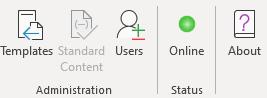
Figure 95
The sections below detail the DynamicTemplate functions and dialog boxes specific to Outlook.
2.5.1. Standard Content blocks
Emails, meetings, tasks and similar items in Microsoft Office Outlook can be created using RichBlocks, TextBlocks and ComboBlocks of the file types ‘.doc’, ‘.docx’, ‘.docm’, ‘.txt’ and ‘.tdsx’. These all function in the same way as in Word. Fields within Standard Content blocks used in Outlook also function in the same way as in Word. However appendices are always inserted as attachments. Refer to section 2.2. Microsoft Office Word for information on the creation and use of RichBlocks, TextBlocks, and ComboBlocks.
Was this article helpful?
That’s Great!
Thank you for your feedback
Sorry! We couldn't be helpful
Thank you for your feedback
Feedback sent
We appreciate your effort and will try to fix the article