Nexl is a Customer Relationship Management (CRM) system, that is mainly targeted towards legal companies.
An integration to Nexl has been developed, the purpose of which is to be able to fetch data from Nexl and input them into a document using content controls.
Overall, Nexl has a very detailed documentation of the integration, which can be found here.
CMD
<cmd
    case="Omnidocs.NEXLIntegration:InsertData"
    apiKey="xyz"
    endpoint="https://xyz/api/graphql"
    OutputVariables="true"
    Prefix="to">
    <SearchFilters>
        <Filter property="TERM" operator="CONTAINS" defaultValue=""/>
        <Filter property="COMPANY_NAME" operator="CONTAINS" defaultValue=""/>
        <Filter property="CITY" operator="CONTAINS" defaultValue=""/>
    </SearchFilters>
</cmd>
Command Parameters
The apiKey and the endpointparameters hold the key and the link to the customer's Nexl service respectively. These are usually provided by the client, while the ones in the example above can be used for internal testing purposes.
Setting the OutputVariables parameter to true will display the variables that are fetched, and thus available to be displayed in the corresponding content controls, in the word.log.
Lastly, the Prefix allows the configurator to set a prefix to target specific content controls. This can be quite useful in instances where the above command is used in an event and in a button, or in two different buttons, and it is required to insert data twice without overwriting the previously inserted data. For example, in the configuration above "to" is set as the prefix. This means that only content controls whose tag starts with "to" will be triggered (fx. "to.primaryemail" or "to.address").
Search Filters
Another part of the command is the "Search Filters" XML element. It can only contain "Filter" elements, each of which allows the configurator to control which search boxes will appear in the API's user interface.
As seen above, each "Filter" contains 3 parameters:
The property parameter is where the search value is defined. A list of the available values can be found in this link. In the example above, the first filter ("TERM") will enable a search box, that will search throughout all the available data (i.e. free text search), while the other two ("COMPANY_NAME" and "CITY") will only search through the contacts' company names and cities respectively.
In the operator parameter the search's operator is defined (list of available operators) while in defaultValue the search's default value is defined.
Defining the Queries
It is possible to define what kind of data is fetched in the "QueryContacts.txt" file that is placed in the "OfficeExtensions\Content\Omnidocs.NEXLIntegration" folder. The queries are defined in that text, in a style that is similar to JSON logic-wise. More info about queries may be found in this link. An example can be found below:
query Contacts(
    $filter: ContactsFiltering,
    $filters: [ContactFilter!],
    $orderBy: ContactsOrderBy,
    $page: Int,
    $perPage: Int
) {
    contacts(
        filter: $filter,
        filters: $filters,
        orderBy: $orderBy,
        page: $page,
        perPage: $perPage
    ) {
        entries {
            archivedAt
            company {
                category
                info{
                    name
                    headquarterLocation {
                        location {
                            city
                            country {
                                name
                            }
                        state
                        postCode
                        streetAddress
                    }
                }
            }
        }
        createdAt
        emailAddresses
        id
        info {
            firstName
            lastName
            id
        }
        isArchived
        isEmployee
        isPersonal
        primaryEmail
    }
    pageInfo {
        totalEntries
        totalPages
    }
    }
}
Binding the Fetched Data to the Document
A simple way to find what kind of data is fetched is to run the command, fetch the data (even if they won't be bound anywhere), and open Word.log. In the log, all the variables (their paths to be more precise) should be displayed (as long as OutputVariables is set to true) as seen in the screenshot below:

Alternatively, the variables' paths can be figured out using the "QueryContacts.txt" that was mentioned above.
The value of each variable will be sent to a content control that has the path to the variable (as displayed in the Word.log file). Of course, the path needs to be added after the defined prefix and a dot (.). A binding example can be seen below:
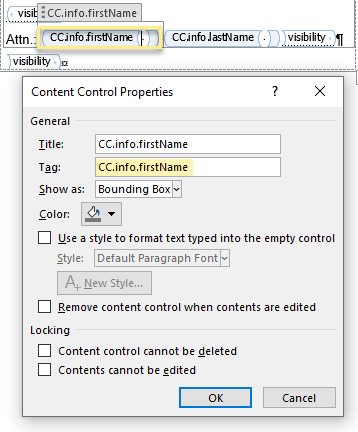
In the case above, the value of the "firstName" variable will be inserted into the binding. As seen in the Word.log screenshot, the variable's path is "info.firstName" and in this case the prefix is set to be "CC".
Was this article helpful?
That’s Great!
Thank you for your feedback
Sorry! We couldn't be helpful
Thank you for your feedback
Feedback sent
We appreciate your effort and will try to fix the article