IMPORTANT: If you use below guide to create custom translations, be aware that updating client's Alloy version will overwrite custom translations.
How to
In Alloy it is possible to create translations for group labels in the ribbon, for instance the label "Accessibility":
To do so, navigate to the Common\Language folder and open the da-DK.xml and en-GB.xml files.
Here, you can create a custom label and list a translation, like so:

In this example, we've created a custom group label translation for the word "AccessibilityLabel".
Next, navigate to the \Modules folder, and rename the group label to match the custom translation label:
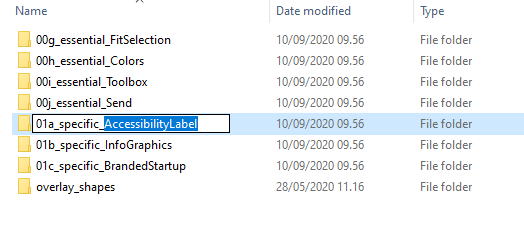
The label will now translate based on the contents of the HKCU_Global.reg key.
Was this article helpful?
That’s Great!
Thank you for your feedback
Sorry! We couldn't be helpful
Thank you for your feedback
Feedback sent
We appreciate your effort and will try to fix the article