It is possible to make UI for AddinLoader, where the user will be able to set load behavior for installed addins to manual or on startup in a dialog box. In this way, the user can easily select specific addins to be loaded on startup and save the changes, thus the addins will load next time Word is being started.
CMD
<Cmd case="SkabelonDesign.AddinLoader:ShowAddinsDialog" />
settings.json
Save user settings in their Content folder in a .json file with slavepath and load behavior. The .json file must be named settings.json and must contain the following variables:
- MasterPath: The primary location of VBA addin.
- SlavePath: Destination path of VBA addin /addin will be copied here when Word launches and loaded from here.
- Title: The title of the addin to appear in the UI.
- Description: The description of the addin to appear in the UI.
- Enforce: Overrides any user settings and makes the addin always enabled. Use
trueorfalse. - LoadBehavior:
Manualmeans the user must activate manually when needed.OnStartupmeans it will start up with Word.
These must be added to the AddinLoader setting json file. Here is an example:
{
 "VbaAddins": [
 {
 "MasterPath": "%content%\\accounts.dot",
 "SlavePath": "%appdata%\\OfficeExtensions\\AddinLoader\\accounts.dot",
 "Title":"Accounts",
 "Description":"Used for creating Statement of Accounts.",
 "Enforce": false,
 "LoadBehavior": "Manual"
 }
 ]
}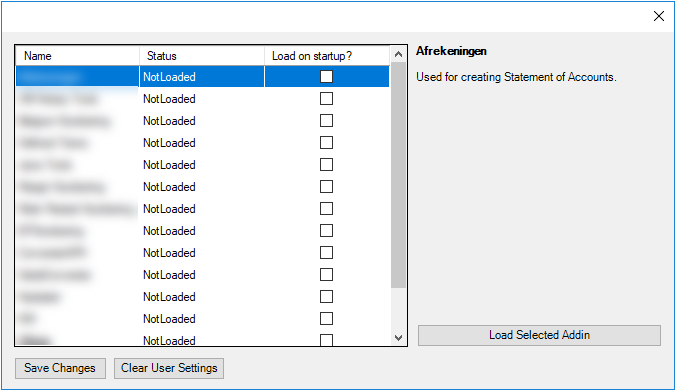
In order to be made available in the UI the VBA file and its JSON file must be present in %Content%. If one of the two is missing the UI will load with that add-in not appearing in the list.
Was this article helpful?
That’s Great!
Thank you for your feedback
Sorry! We couldn't be helpful
Thank you for your feedback
Feedback sent
We appreciate your effort and will try to fix the article